
Inspection Repair Follow-Up Form


(1)
An Inspection Repair Follow-up Form is a tracking document that records all repairs found during property inspections until contractors finish all the work. Specifically, it captures inspection findings, repair details, contractor information, timelines, and sign-off records.
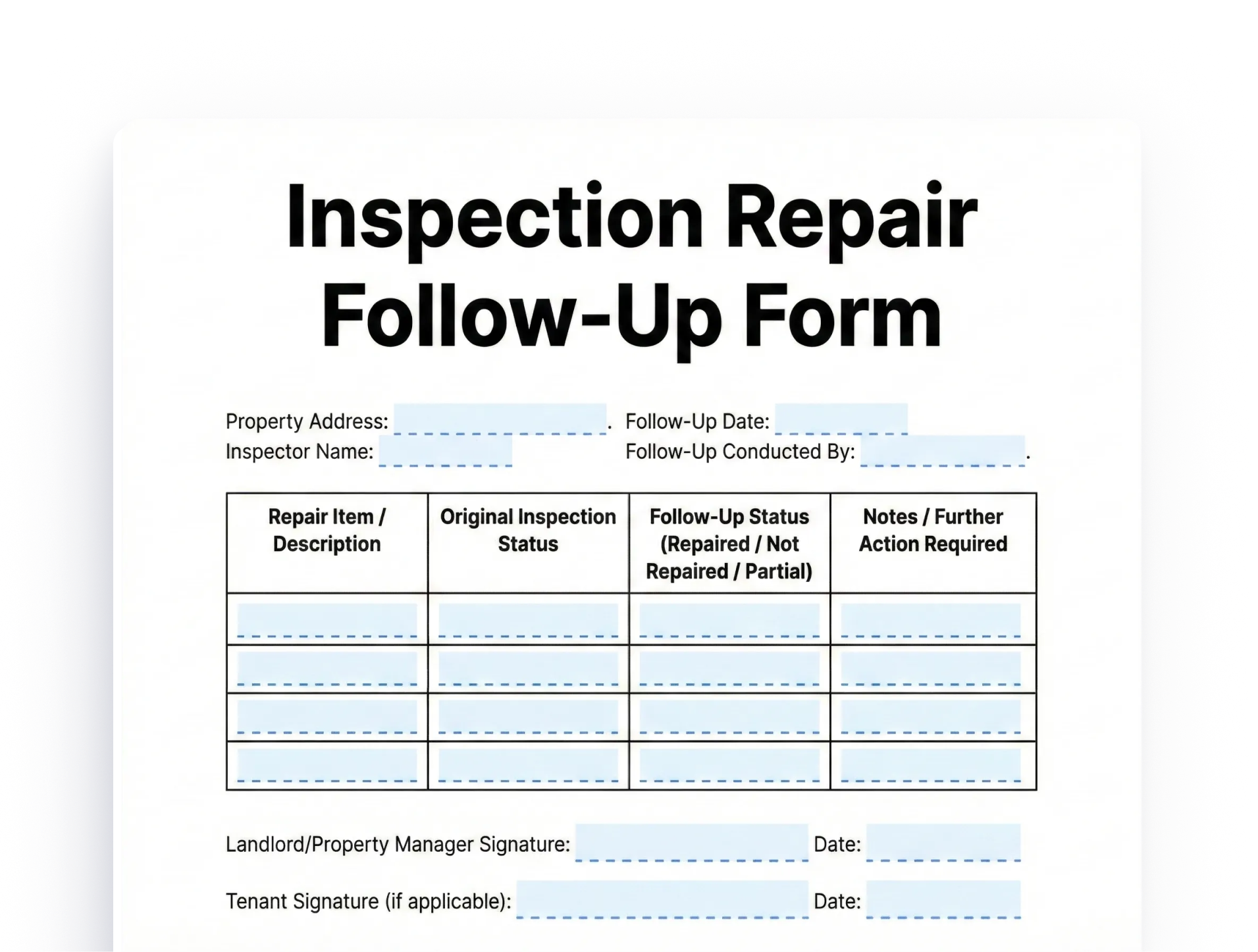
Download as PDF when complete
Inspection Repair Follow-up Form: Definition and Purpose
How This Form Helps Property Managers
The Inspection Repair Follow-up Form acts as your central hub for managing repairs after an inspection. Instead of relying on memory or scattered notes, you keep organized records showing what needs fixing, who is responsible, and the current status of each item. In addition, completed forms serve as proof that you handled maintenance issues quickly when disputes come up with tenants or during property sales.
Who Uses an Inspection Repair Follow-up Form
Property managers use this tool to track multiple ongoing repairs across different properties at the same time. It works for residential and commercial portfolios of any size, and is especially useful when managing several contractors at once.
Why Property Managers Need an Inspection Repair Follow-up Form
Preventing Maintenance Backlog
Inspection reports often list dozens of items, ranging from small cosmetic issues to serious safety concerns. Without a system to track them, urgent repairs get delayed while minor problems grow over time. An Inspection Repair Follow-up Form sorts items by urgency and helps ensure timely completion before backlogs build up.
The form also helps you spot recurring problems that need lasting fixes rather than quick patches. When the same issue shows up in multiple inspection cycles, your records reveal the pattern. As a result, you can fix the root cause through a larger improvement rather than keep patching the same symptom.
Maintaining Property Value With an Inspection Repair Follow-up Form
Delayed repairs speed up wear and reduce a property’s worth significantly. Your follow-up form ensures repairs happen on time, keeping the property in good shape and market-ready. In addition, a clear repair history can boost a property’s value during a sale by showing buyers that the owner took good care of it.
How Your Repair Follow-up Form Saves Money
Staying on top of repairs also stops small problems from turning into big expenses. For example:
- A small roof leak found during inspection may cost only a few hundred dollars to fix
- Left alone for months, that same leak can cause structural damage, mold, and repairs costing thousands
Your tracking system ensures early action saves money over time.
Legal Protection From Your Inspection Repair Follow-up Form
Legal and Liability Protection
Documented repair tracking protects you from claims that you neglected maintenance. If tenants say they were hurt because of a delayed repair, your follow-up forms show when you found the issue and how fast you responded. This record proves you took reasonable care to keep the property safe.
Meeting Code Deadlines With Your Inspection Repair Follow-up Form
Some areas require landlords to fix certain issues within set timeframes. Your follow-up form helps you meet those deadlines every time. Missing code deadlines can lead to fines and legal trouble. Staying organized keeps you in step with all rules and regulations.
Essential Components of an Inspection Repair Follow-up Form
Inspection Details Section
Every Inspection Repair Follow-up Form should begin with complete inspection information to set the context for all repairs. Include:
- Inspection date and inspector name
- Property address
- Type of inspection such as move-in, move-out, routine, or pre-sale
- Inspection report number for easy reference
Also record who attended the inspection, including property managers, tenants, contractors, or owners. This record clarifies who saw the problems firsthand. Furthermore, note any urgent safety concerns that need immediate attention before normal repair scheduling begins.
Repair Item Descriptions and Severity Ratings
Create clear descriptions for each repair item found during the inspection. Specify the exact location, such as “master bedroom ceiling” or “kitchen sink faucet.” Describe the problem in plain terms rather than vague language.
Assign a severity rating to each item using categories such as:
- Critical — immediate safety hazard requiring emergency response
- High priority — affects livability or risks major damage
- Medium priority — minor function issues or moderate concerns
- Low priority — cosmetic or very minor problems
Budgeting and Contractor Details in Your Inspection Repair Follow-up Form
Cost Estimates and Budgeting in Your Repair Follow-up Form
Record estimated repair costs for each item using past data or contractor quotes. These estimates help you sort repairs by budget and flag items that need extra approval. In addition, track actual costs after completion to check how accurate your estimates were and spot trends over time.
Also note the funding source for each repair, such as the operating budget, reserve funds, or tenant responsibility. This tracking ensures proper cost recording. Furthermore, it helps you decide whether a security deposit covers move-out repairs or if you need to collect more.
Contractor Assignment Details
Record which contractors you assigned to each repair. Include:
- Contractor name and contact details
- License number and insurance verification date
- Date you asked for quotes and when you received them
- Date you issued the work order
Track scheduled start dates for each repair as well. Some contractors have waiting lists and need advance notice. Your follow-up form helps you manage multiple contractor schedules at once. In addition, it shows which contractors consistently meet deadlines and which ones cause delays.
Completion and Verification in Your Inspection Repair Follow-up Form
Documenting Repair Completion
Create a section to record when repairs are finished. For each completed item, note:
- Actual finish date and final cost
- Description of the work done and materials used
- Any changes from the original plan and why they happened
This detail is useful for future reference and helps future contractors understand what was already done.
Verifying Quality of Completed Repairs
Include a verification section showing who checked the finished work and confirmed quality. Sometimes the property manager does the final check, while other times a tenant or owner confirms completion. Document:
- Verification date and who signed off
- Any follow-up issues found after the initial completion
- Photos taken before and after the repair
This sign-off process ensures repairs truly fixed the original problem and did not just cover it up.
Best Practices for Using Your Inspection Repair Follow-up Form
Prioritization and Scheduling
Set clear priority rules based on safety, livability, and cost. Follow these general timelines:
- Critical items — within 24 hours, regardless of cost or scheduling
- High priority — within one week to prevent tenant complaints or further damage
- Medium and low priority — within 30 to 60 days following normal maintenance scheduling
Also, batch similar repairs together when possible. For example, schedule all painting touch-ups at once rather than making several separate trips. This reduces contractor costs and limits disruption for tenants.
Communication Protocols for Repair Follow-up
Set up standard steps for sharing repair status updates. Let tenants know when you find issues, when contractors are scheduled, and when work is complete. This open approach builds trust and reduces complaints about slow maintenance. In addition, give tenants estimates of when contractors will arrive and what access they will need.
Keep property owners in the loop about major repairs found during inspections. Share your follow-up forms showing repair progress, costs, and completion dates. This shows active management and avoids surprises when owners review expenses. Furthermore, it gives owners the chance to approve or reject large costs before work begins.
Choosing the Right Inspection Repair Tracking System
Digital vs Paper Inspection Repair Tracking Systems
Digital tracking systems offer real advantages over paper forms. Property management software often includes inspection and work order tools that:
- Create follow-up tracking automatically
- Send reminders when repairs are close to their deadline
- Allow real-time status updates from a phone or tablet
However, paper forms still work well for smaller portfolios or managers who prefer physical records. You can use a clipboard form during inspections, then transfer the data to a master spreadsheet later. Regardless of which method you choose, being consistent and complete matters more than the format itself.
Quality Control Measures
Always verify that repairs meet quality standards before marking items as complete. Never rely only on a contractor saying the work is done. Do a physical check to confirm the repair fixed the original problem and meets your standards.
Take photos before and after each repair to document the problem and the solution. These images:
- Provide evidence in case of future disputes
- Help future contractors understand what was done before
- Can be used in marketing to show the property’s condition and care
Managing Multiple Properties With Your Inspection Repair Follow-up Form
Portfolio-Wide Monitoring
Managing multiple properties requires a central view of all pending repairs across your entire portfolio. Create a master spreadsheet or dashboard that shows:
- All high-priority items needing immediate attention
- Which properties have the most open repairs
- Overall repair progress by property
This overview prevents any property from being overlooked due to competing demands. In addition, it helps you spot patterns that affect multiple properties — for example, if a certain roof type needs proactive care across several buildings.
Resource Allocation and Contractor Performance
Use your tracking data to assign maintenance resources wisely. For instance:
- Properties with many open repairs may need extra attention or a dedicated contractor
- Well-maintained properties with few issues allow you to focus resources elsewhere
Also track contractor performance across all properties. Contractors who deliver quality work on time deserve more jobs. Those who miss deadlines or deliver poor work should be reviewed or replaced.
Reporting and Analysis Using Your Repair Follow-up Form
Create regular reports showing repair activity, costs, and completion rates. Share these with property owners during monthly or quarterly reviews. In addition, look at trends over time to see whether maintenance costs are going up, staying flat, or coming down.
Use past data to improve future inspection planning and budgeting. If certain systems tend to fail after a set number of years, plan replacements before failures happen. This forward-thinking approach reduces emergency repairs, keeps tenants happy, and helps you control costs.
Inspection Repair Follow-up Form: Key Takeaways
An Inspection Repair Follow-up Form turns property maintenance from reactive chaos into a proactive, organized process by tracking every repair from discovery through completion. To use it well, record findings immediately with severity ratings, assign contractors quickly, keep all parties informed, verify completed work with photos, and review your log regularly.
FAQs
An Inspection Repair Follow-up Form is a tracking document that records all repairs identified during property inspections and monitors each item from discovery through contractor completion, capturing repair descriptions, timelines, costs, and verification details.
Property managers need this form to prevent maintenance backlogs, preserve property value, protect against liability claims, and ensure compliance with local repair deadlines by maintaining organized records of every repair item and its status.
The form should include inspection details, specific repair descriptions with severity ratings, cost estimates and actual costs, contractor assignment information, scheduled completion dates, and verification records confirming the quality of completed work.
Critical safety issues should be addressed within 24 hours, high priority repairs within one week, and medium to low priority items within 30 to 60 days, with similar repairs batched together when possible to reduce contractor costs and tenant disruption.
The form supports portfolio-wide monitoring by allowing property managers to create centralized dashboards that display all pending repairs across every property, identify recurring problems, track contractor performance, and allocate maintenance resources strategically.